
Shell Mobility System
Service operation discovery and research assessments,
integrating operative insights with system capabilities
for enhanced field performance.
Client
Shell Global Plc
Year
2022
Industry
Oil & Gas
Type of Work
Research
Service Design
Cross Collaboration
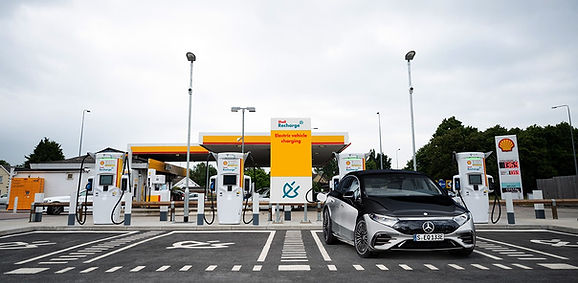
Shell Mobility Division is revolutionising traditional automotive business models by leveraging digital technology to create a cleaner, more sustainable mobility future.
By integrating user research, design thinking, and collaboration, the programme enhances real-time site management for frontline field teams.
It helps streamline daily tasks, make on-site work more efficient, respond to customer needs faster, and ultimately improve overall service delivery performance, shaping the future of mobility services.
Engagement Highlights
Services, Deliverables, Results
What
-
Fleet Management Transformation
-
Cross-Functional Collaboration
-
Platform Integration
-
De-carbonisation Journey
How
-
Discovery & Validation
-
User Research
-
Co-design Workshops
-
User Testing & Improvements
-
Stakeholder Alignment
-
Storytelling & Blueprint
Outcome
The enhanced Beeze app empowered operatives with clearer workflows, better visibility, and reliable time tracking, making their daily jobs simpler and more efficient.
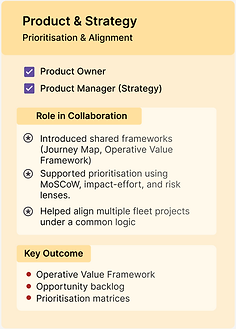
Cross-Functional Collaboration Framework
Aligning Business, Research, Product and Design and Delivery for shared outcomes.



Bridging the Gap Between Design and Field Reality
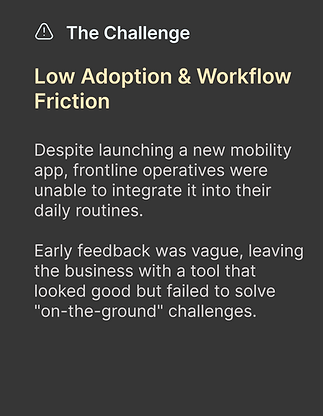


Framing Research Approach
We structured the research under four categories - Discover & Plan, Hypothesis, Research, and Insights.
While it looks systematic in grouping, the process was intentionally non-linear, allowing iteration across stages. This ensured flexibility to adapt methods, revisit assumptions, and refine focus as new insights emerged.

Generating Hypotheses
We generated three core hypotheses based on stakeholder interviews, documented feedback, and reviews.
Each hypothesis connected potential app features to user goals - for example, planning daily tasks through a worklist, capturing images for accurate vehicle damage reporting, and tracking transit time for precise job reporting.


Behind the Process
Designing User Recruitment Strategy
Three key regions with the highest work orders were selected to reflect differences in local workflows, challenges, and conditions.
Operatives were chosen across experience levels: new operatives with about a month on the job, intermediate operatives with three or more months of experience, and industry switchers with prior experience at a competitor brand plus at least one month at Shell. This ensured coverage of both regional variety and the full range of operative experience

Plan to Research Execution
Two different methods were used to understand how users actually work.
A day in life of Operative : Record themselves during a typical workday, which revealed how they really use the app in the field.
In Dept Interviews : Walking through dummy orders together to gather their thoughts on each screen for the three main features identified for improvement.


Insight Discovery
Uncovering key challenges and opportunities
Fragmenting each interview into the micro sections (Key highlights, Pain points, Surprises, Behaviours) to acquire in-depth comprehension of individual mental models.
Gathering the micro sections and interlinking them to perceive comprehensive patterns. Applying the WHAT-WHY-HOW Framework to extract insights from the identified patterns.


Pain Points ( Daily Routine Tasks )
-
In-app travel times, ETAs, and appointment slots are often unreliable, making planning difficult.
-
Essential details like addresses, work order numbers, and job slots are either concealed or unclear.
-
Features such as job durations, ETAs, and status colours don’t reflect actual on-field workflows.
-
Users lack confidence in app calculations and rely on personal judgment or external tools instead.
-
The app adds complexity by forcing operatives to switch between multiple channels.
-
The system doesn’t adapt to regional differences in accounts, standards, or workflows, reducing its relevance.
Short Summary
Each hypothesis revealed different sets of challenges:
-
Daily Routine Tasks → 10 findings
Showed problems with planning jobs, scheduling, teamwork, and seeing the right information on time.
-
Capture Image Stage → 20 findings
Pointed to issues with photo quality, unclear steps for taking pictures, missing details like timestamps, and extra effort in retaking or uploading images.
-
Chargeable / Transit Time → 12 findings
Uncovered confusion about what counts as chargeable, errors in tracking travel time, and lack of clarity in time logs.


In-app schedules are unreliable, forcing operatives to manually recheck travel times and job slots
"There are two people involved in a job but we are not putting it on the system. The system plan is only for 1 person"

England, User 2
System assumptions don’t match real job workflows, so features are ignored
“I don’t really know why these colors are green, yellow. If I have to guess – Green it means that we start the job the first steps, then a yellow we are in.”

Germany, User 3
Current capturing procedure is slowing down operatives instead of guiding them
“I worked in a different company. They would do basically the same thing, but they wouldn’t say front left, right and back. It just says like take the pictures, and the guy would tell us how to do it, how many pictures so we know we were ok. So it had a lot less clicks.” – Spain, User

England, User 3
In app parking restrictions doesn't match from Real Environments
“I just follow the flow given on the screen to capture the images. In cases where the car is parked very close to something, I need to improvise.”

Spain, User 2
Workarounds is Creating Parallel Systems
“I always have my mobile in my hand… I take this timestamp picture. It’s much quicker than pulling out the pen and paper.” – Spain, User 1

Spain, User 1
Incomplete or Poorly Timed Customer/Vehicle Data
“Maybe the VIN number would be good to see here… Currently I have to go use the information I get from our dispatcher.”

Germany, User 1
Mapping the Current State
The journey map revealed that operatives rely on a patchwork of external tools because the app lacks trust, flexibility, and visibility. It surfaced systemic mismatches across business rules, UX clarity, and technical implementation, rather than isolated bugs. Crucially, the exercise uncovered new touchpoints, like pre-day planning, team coordination, and evidence management, that the app does not yet support. The Capture Image stage emerged as the biggest friction point (20+ issues), followed by Planning/Preparation and Chargeable Time, pointing to clear priorities for redesign.

Identification of Touchpoints
-
Use of multiple communication tools like Telegram, WhatsApp, or emails.
-
Time-tracking UI, play/pause icons unreliable leading to paper/timestamp backups.
-
Features unused/bypassed due to mismatch with realities.
-
Navigation always defaults to Apple Maps, relying on external apps.
-
Time slots and exact appointment times difference, making scheduling unclear.
-
Reviewing and Confirming not possible after finalization.
-
Unclear clear feedback loops, doubling up the work.
-
Closing notes absent to provide audit integrity.
Ideation
The aim of this stage is to take the pain points and touchpoints we uncovered in the journey map and turn them into real opportunities for improvement.
As a team our focus is to optimise key workflows, like planning, image capture, and chargeable time so they feel simpler, more integrated.
Outcomes
-
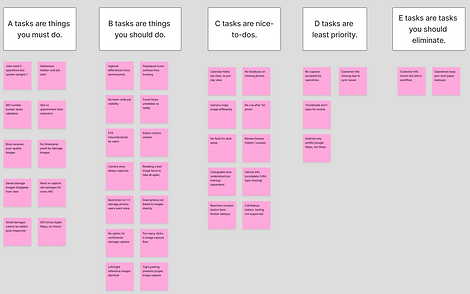
Tagging of user story using dot voting against teams with a recommended action assigned.
-
Prioritisation of all requirement using ABCDE method.
-
Common insight report for all party internal reference.
-
Value Proposition & Service Blueprinting
Workshops
Through a series of co-design workshops with product owners, implementation leads, and frontline operatives, we uncovered the biggest opportunities to improve the mobility app experience.
Using dot voting, we aligned business, UX, and dev teams taking ownership for their user stories.
We then reframed these user stories with How Might We questions, generated rapid ideas through Crazy 8's.
This collaborative process ensured that solutions were not only creative but also grounded in real user needs and business priorities, creating a shared vision for the next stage of product.


Future State
Storyboarding the future experience
Notification a
day prior

Visibility of other team members

Checking Orders and Reaching to team members

Data Logging( WOID + OID)

Tag region Filter

Work Planning

Next Day - Waiting for driver

'Driver' starts the trip

Operative 'Picked up'

Reached Parking Location

Recorded Timestamp at every milestone

Record Damages


Add missing photos
and submit the job
Delivery
The Operative Value Framework was created to anchor product and service development around the lived realities of operatives. By articulating their values, Clarity, Reliability, Flexibility, and Trust, across the stages of Prepare, Commute, Perform, and Complete, it provides a common reference point for design, business, and technical teams.
This framework helps align decision-making across countries and functions, ensuring that future iterations of the service address real user needs while maintaining organisational consistency.

Usability Testing


User testing was conducted continuously with rapid prototypes, ensuring insights stayed aligned with evolving needs while uncovering further usability issues.
Areas where operatives struggled were logged as continuous improvement tickets in Azure DevOps, creating a clear path for refinement. Weekly updates of findings kept stakeholders informed and aligned on shifting priorities, reinforcing an iterative, user-centered approach to product development.
Service Blueprint

Shell Mobility Medium Size Fleet
Disclaimer : Some Parts have been blurred/hidden due to non-disclosure agreement.
Please contact to know more !
Next Project